
Atlence FileTime Manager3.2 - Download
You'll be able to download in few seconds.
Publisher Description
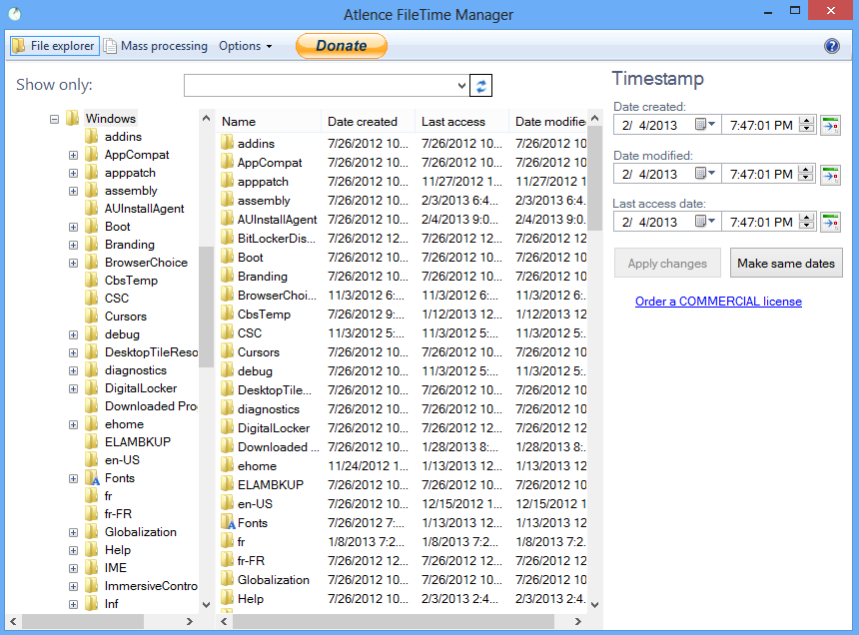
Atlence FileTime Manager allows you to change the timestamp of files and folders on your computer by a simple click or by automation. The application can also monitor any change in date/time of your files and folders and notify you or perform a specific action like launching a program.
Easy change timestamp of files and folders
1) The program allows you to change the timestamp of your files and folders by selecting them from a tree similar to Windows Explorer.
2) A particular display allows you to perform a bulk processing task (modify all the files and subfolders in a folder at the same time).
3) Thanks to its integration with Windows Explorer, it is possible to change the date and time of the selected files and folders in only one click. You can also rename them with the date and time at the end of their name. Enjoy this feature by renaming your backup files for example!
Monitor any change in the timestamp of your files and folders
An option allows the program to continuously analyze any change in date/time of your files. If so, you will be notified. You can also perform a particular action, such as launching an application, resetting the date/time and so far. For example, the program can notify you when a file has been modified sensitive. It can also be used to fight against piracy and virus alerts you when a monitored file has been modified by a third party.
Schedule a change to date and time
Another feature allows you to schedule any change to file timestamp, based on specific rules and triggers: every hour, every week, once the date/time has been changed, and so far. For example, you can be discreet about a modification of a file by restoring the date and hour from their previous values!
Some command lines allow you to access to all program features. Actions can be performed on files and folders that you specify in the command line, such as a list in a text file. It is possible to use the application in any script.
About Atlence FileTime Manager
This File & Disk Management program is available in English, French. It was last updated on 29 September, 2026. Atlence FileTime Manager is compatible with the following operating systems: Android, Windows.
The company that develops Atlence FileTime Manager is Thomas, Mathieu DUBAELE (Atlence.com). The latest version released by its developer is 3.2.
The download we have available for Atlence FileTime Manager has a file size of 3.1 MB. Just click the green Download button above to start the downloading process. The program is listed on our website since 2015-03-15 and was downloaded 0 times. We have already checked if the download link is safe, however for your own protection we recommend that you scan the downloaded software with your antivirus. Your antivirus may detect the Atlence FileTime Manager as malware if the download link is broken.
How to install Atlence FileTime Manager on your Windows device:
- Click on the Download button on our website. This will start the download from the website of the developer.
- Once the Atlence FileTime Manager is downloaded click on it to start the setup process (assuming you are on a desktop computer).
- When the installation is finished you should be able to see and run the program.
Program Details
General
System requirements
Download information
Pricing
Version History
version 3.2
posted on 2015-03-15
Supports Windows Vista, Windows 7 and Windows 8 (desktop), new modern and more user-friendly user interface,improved integration with Windows Explorer,new simplified setup program,fixed various bugs
Disclaimer
External Download
We do not host Atlence FileTime Manager on our servers. We did not scan it for viruses, adware, spyware or other type of malware. This app is hosted by the software publisher and passed their terms and conditions to be listed there. We recommend caution when installing it.
The external download link for Atlence FileTime Manager is provided to you by apps112.com without any warranties, representations or guarantees of any kind, so access it at your own risk.
If you have questions regarding this particular app contact the publisher directly. For questions about the functionalities of apps112.com contact us.
